교보문고 고객센터 페이지를 모델로 하여 MVC 패턴을 유지하면서 ajax를 이용한 비동기 통신을 통해 DB에 저장된 데이터를 브라우저로 출력하는 로직을 기록할 예정입니다.
지난 포스팅에서 고객센터 페이지 구현에 필요한 DB 테이블 설정과 서버에서 보낼 데이터 형식을 기록했습니다.
이 게시물에서 고객센터 메인 페이지 및 FAQ 페이지의 중요한 HTML 코드를 살펴보고 FAQ 페이지가 요청되는 두 가지 방법을 요약해 보겠습니다.
표적
JSP에서 MVC 패턴을 유지하면서 AJAX를 통해 데이터를 출력할 수 있습니다.
교보문고 고객센터 페이지 구현 가능합니다.
논리 흐름 코드 및 실행 화면
1. 고객센터 메인페이지(index.jsp)
1-1. ▼ 고객센터 메인화면
아래 이미지는 상단의 ‘고객센터’ 내비게이션 바를 클릭했을 때 반응하는 고객센터 메인 화면입니다.
요청 URL은 http://localhost:8090/cscenter.ok입니다.
이 페이지에서 중요한 것은 아래 보라색 상자의 코드입니다.
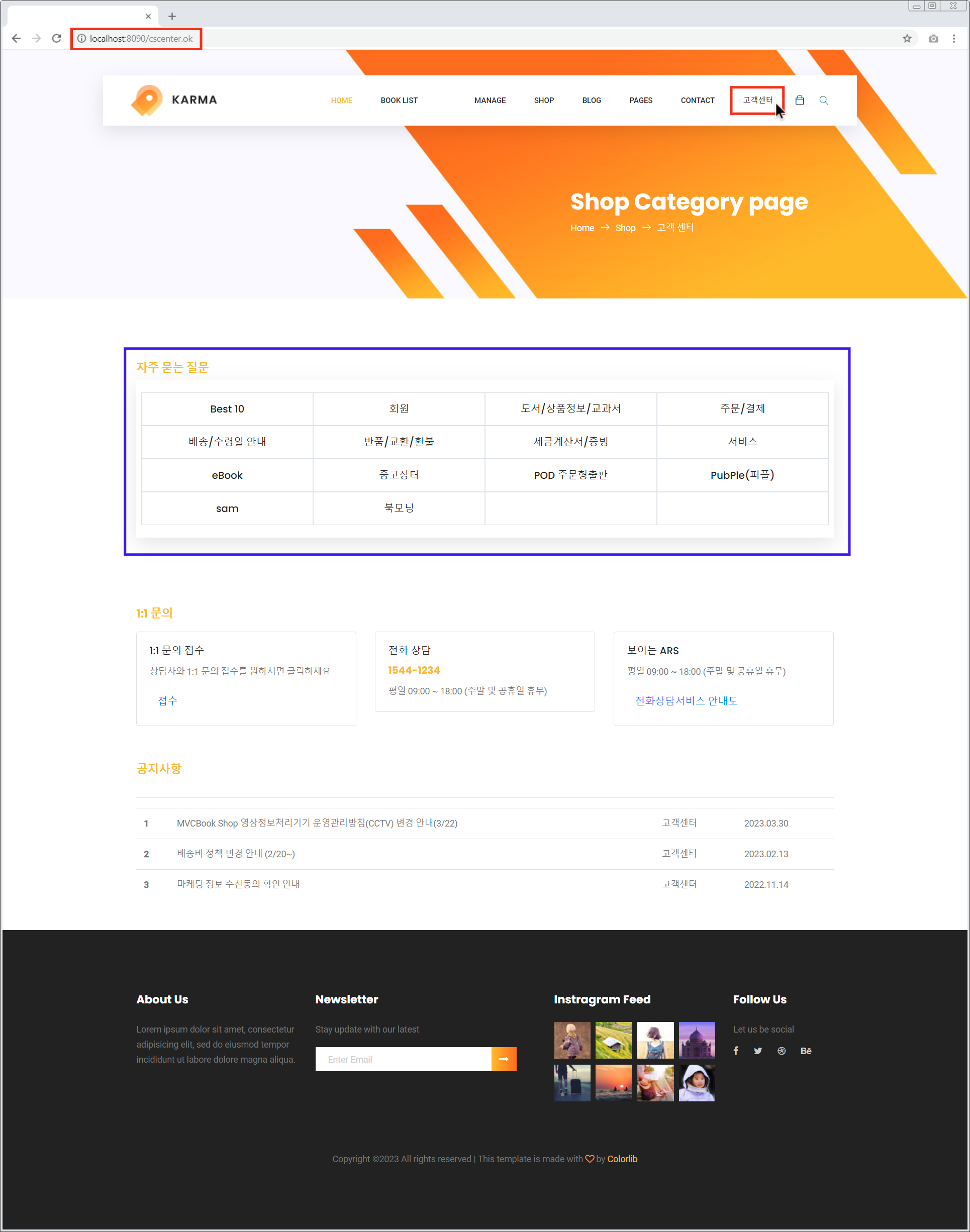
1-2. ▼ 고객센터 메인 페이지 ‘자주 묻는 질문’ 영역 HTML
각 주요 카테고리를 클릭하면 해당 페이지의 href 속성의 URL로 페이지를 요청합니다. 꼬리표.
요청한 URL은 http://localhost:8090/cscenter/faq.ok이며, 이때 ‘Best 10’을 제외한 나머지 주요 카테고리는 매개변수 fcode를 가집니다. 이 fcode 매개변수 값은 주요 분류 테이블(faqcode)의 PK 열인 fc_code 값입니다.
<!-- 대분류 영역 -->
<section class="features-area section_gap">
	<div class="container">
        <div class="container-header">
            <h4><b>자주 묻는 질문</b></h4>
        </div>
        <div class="features-inner text-center" style="padding: 20px 0 !important;">
            <div class="row row-cols-4 mx-2">
                <div class="col-3 p-2 border">
                    <li class="mt-2" style="list-style-type : none; ">
                        <a href="http://persimmon-ary-stepbystep.m/${request.getContextPath() }/cscenter/faq.ok"><h5>Best 10</h5></a>
                    </li>
                </div>
                <div class="col-3 p-2 border">
                    <li class="mt-2" style="list-style-type : none; ">
                        <a href="${request.getContextPath() }/cscenter/faq.ok?fcode=1"><h5>회원</h5></a>
                    </li>
                </div>
                <div class="col-3 p-2 border">
                    <li class="mt-2" style="list-style-type : none; ">
                        <a href="${request.getContextPath() }/cscenter/faq.ok?fcode=2"><h5>도서/상품정보/교과서</h5></a>
                    </li>
                </div>
                <div class="col-3 p-2 border">
                    <li class="mt-2" style="list-style-type : none; ">
                        <a href="${request.getContextPath() }/cscenter/faq.ok?fcode=3"><h5>주문/결제</h5></a>
                    </li>
                </div>
                <div class="col-3 p-2 border">
                    <li class="mt-2" style="list-style-type : none; ">
                        <a href="${request.getContextPath() }/cscenter/faq.ok?fcode=4"><h5>배송/수령일 안내</h5></a>
                    </li>
                </div>
                <div class="col-3 p-2 border">
                    <li class="mt-2" style="list-style-type : none; ">
                        <a href="${request.getContextPath() }/cscenter/faq.ok?fcode=5"><h5>반품/교환/환불</h5></a>
                    </li>
                </div>
                <div class="col-3 p-2 border">
                    <li class="mt-2" style="list-style-type : none; ">
                        <a href="${request.getContextPath() }/cscenter/faq.ok?fcode=6"><h5>세금계산서/증빙</h5></a>
                    </li>
                </div>
                <div class="col-3 p-2 border">
                    <li class="mt-2" style="list-style-type : none; ">
                        <a href="${request.getContextPath() }/cscenter/faq.ok?fcode=7"><h5>서비스</h5></a>
                    </li>
                </div>
                <div class="col-3 p-2 border">
                    <li class="mt-2" style="list-style-type : none; ">
                        <a href="${request.getContextPath() }/cscenter/faq.ok?fcode=8"><h5>eBook</h5></a>
                    </li>
                </div>
                <div class="col-3 p-2 border">
                    <li class="mt-2" style="list-style-type : none; ">
                        <a href="${request.getContextPath() }/cscenter/faq.ok?fcode=9"><h5>중고장터</h5></a>
                    </li>
                </div>
                <div class="col-3 p-2 border">
                    <li class="mt-2" style="list-style-type : none; ">
                        <a href="${request.getContextPath() }/cscenter/faq.ok?fcode=10"><h5>POD 주문형출판</h5></a>
                    </li>
                </div>
                <div class="col-3 p-2 border">
                    <li class="mt-2" style="list-style-type : none; ">
                        <a href="${request.getContextPath() }/cscenter/faq.ok?fcode=11"><h5>PubPle(퍼플)</h5></a>
                    </li>
                </div>
                <div class="col-3 p-2 border">
                    <li class="mt-2" style="list-style-type : none; ">
                        <a href="${request.getContextPath() }/cscenter/faq.ok?fcode=12"><h5>sam</h5></a>
                    </li>
                </div>
                <div class="col-3 p-2 border">
                    <li class="mt-2" style="list-style-type : none; ">
                        <a href="${request.getContextPath() }/cscenter/faq.ok?fcode=13"><h5>북모닝</h5></a>
                    </li>
                </div>
                <div class="col-3 p-2 border">
                    <li class="mt-1" style="list-style-type : none; ">
                        <a href="#" onclick="return false"><h5></h5></a>
                    </li>
                </div>
                <div class="col-3 p-2 border">
                    <li class="mt-1" style="list-style-type : none; ">
                        <a href="#" onclick="return false"><h5></h5></a>
                    </li>
                </div>
            </div>
        </div>
    </div>
</section>
<!-- 대분류 영역 -->
2. 고객센터 FAQ 페이지(faq.jsp)
자주 묻는 질문(메인 카테고리)을 클릭하여 요청하는 고객 센터 FAQ 페이지는 두 가지 방법으로 답변됩니다.
여하튼 FAQ 페이지에서 중요한 코드는 FAQ 데이터가 출력되는 부분(아래 이미지 하단의 빨간색 박스)입니다.두 가지 대응 방법을 먼저 살펴본 후, 하위 클래스 카테고리와 FAQ 질문/답변이 표시되는 영역의 HTML을 살펴보겠습니다.
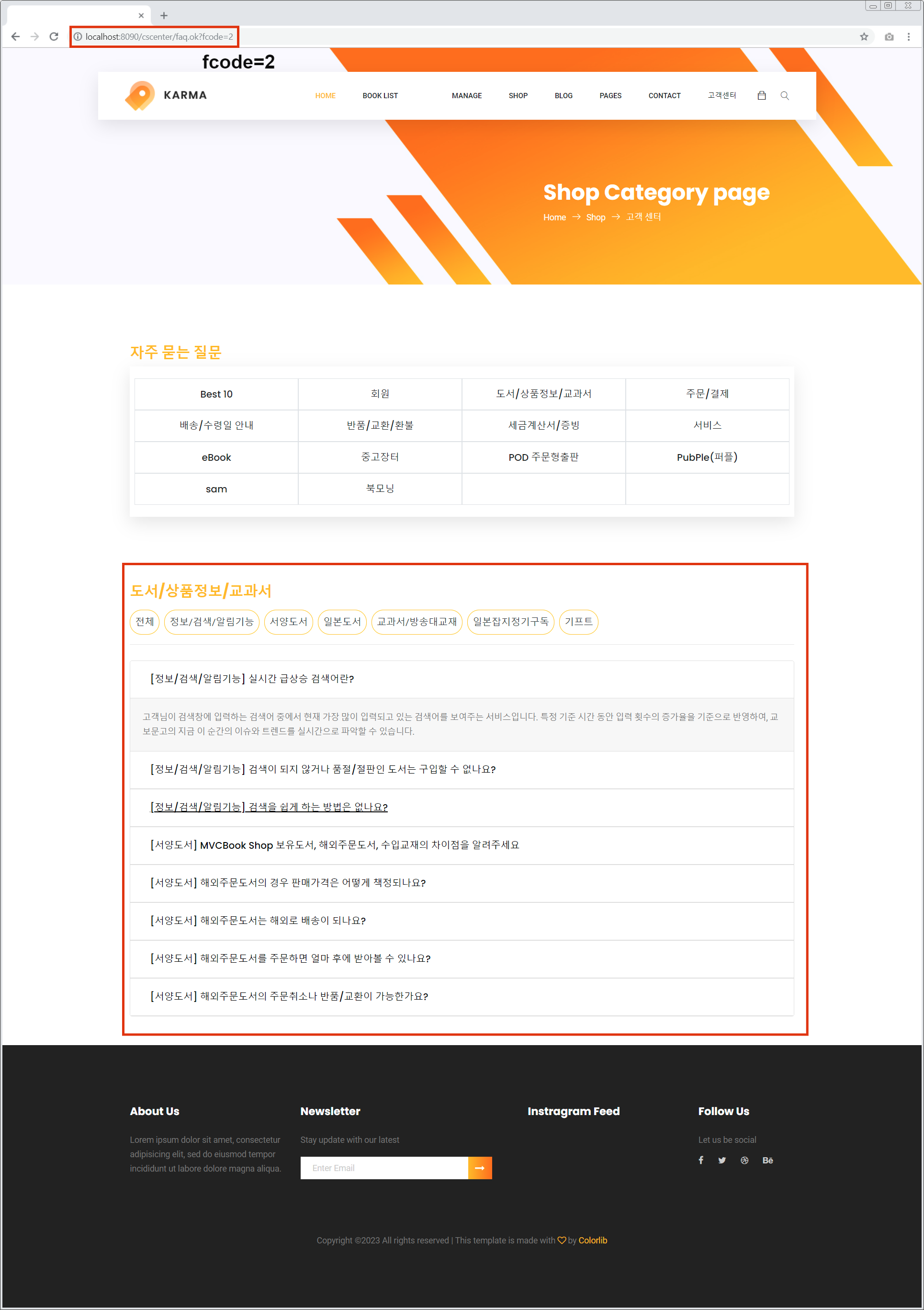
2-1. ▼ 고객센터 메인페이지 메인카테고리 클릭
첫 번째 대응 방법은 URL을 요청하고 고객센터 메인 페이지의 주요 카테고리 영역 중 하나를 클릭하여 응답하는 경우입니다.
아래 이미지는 고객센터 메인화면에서 ‘도서/상품정보/교과서’ 클릭 시 응답 FAQ 화면입니다.
요청한 URL은 http://localhost:8090/cscenter/faq.ok?fcode=2로 새 페이지 응답그리고 분류되었다 영역 하단에는 ‘도서/상품정보/교과서’에 해당하는 모든 FAQ 데이터가 인쇄되고 있는 것을 확인할 수 있습니다(빨간색 상자).
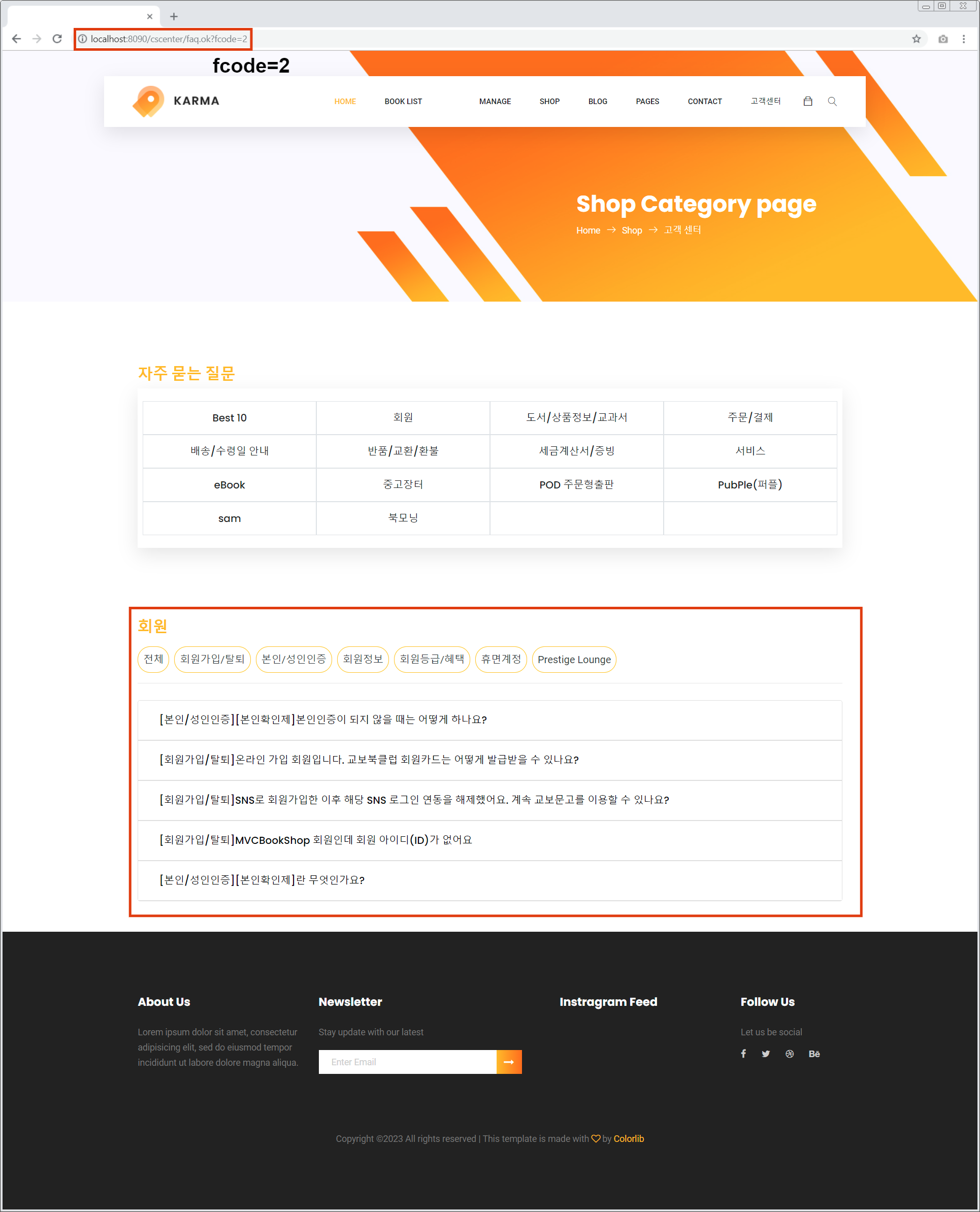
2-2. ▼ 이미 한 번 호출된 고객센터 FAQ 페이지의 메인 카테고리 클릭
두 번째 응답 방법은 2-1의 조치를 취한 후 다른 주요 카테고리 버튼을 클릭하여 응답하는 경우입니다.
아래 이미지는 먼저 ‘도서/상품정보/교과서’ 클릭 후 ‘회원’ 클릭 시 답변FAQ 화면입니다.
메인 카테고리 영역 하단에는 ‘회원’에 해당하는 모든 FAQ 데이터가 표시되지만(하단 빨간색 상자) URL은 변경되지 않은 것을 확인할 수 있습니다.
FAQ 페이지에서 새로운 주요 카테고리를 클릭하면 AJAX로 fcode를 보냅니다.이기기 때문에
2-3. ▼ 고객센터 FAQ 페이지 HTML
살펴보는 부분 하위 카테고리 카테고리와 FAQ 질문/답변이 표시되는 영역의 HTML입니다. 나중에 AJAX로 데이터를 가져와서 아래 영역에 붙일 때 붙여넣을 영역의 클래스명으로 접근하게 됩니다.
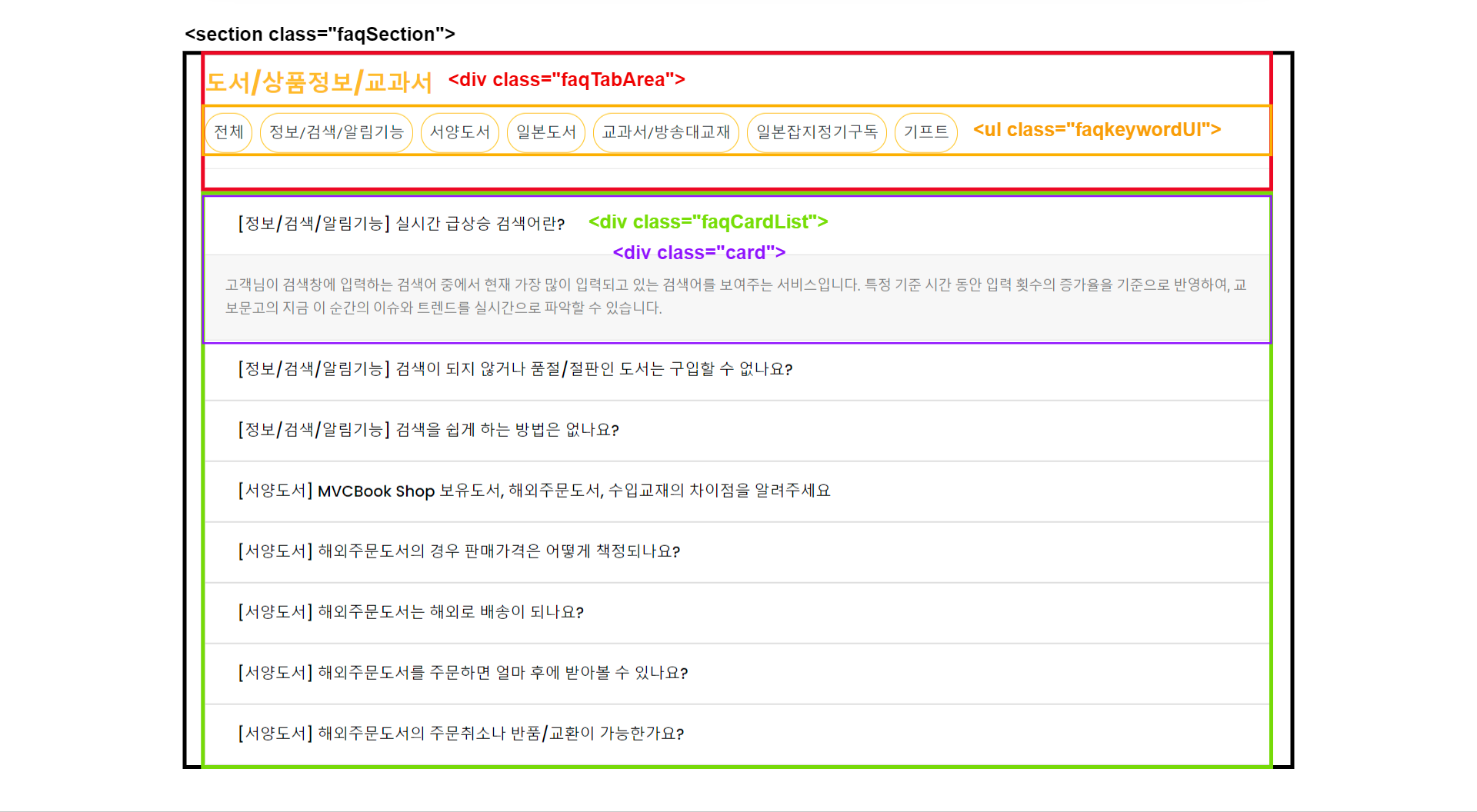
아래는 전체 코드
<!-- faq.ok?fcode=n에 따른 데이터 출력되는 영역 -->
<section class="container mb-5 faqSection">
    <div class="container-header faqTabArea" style="padding:10px 0;">
        <h3><b>도서/상품정보/교과서</b></h3>
        <div style="height: 50px;">
          <ul class="nav h-100 faqkeywordUl">
            <li class="nav-item my-2 mr-2">
              <button type="button" class="fkbtn mh-49 p-2 border border-warning bg-white text-dark" id="tab00"
                            style="border-radius: 20px !important; font-size: 1rem; line-height: 1.5;">
                <span class="text-center">전체</span>
              </button>
            </li>
            <li class="nav-item my-2 mr-2">
              <button type="button" class="fkbtn mh-49 p-2 border border-warning bg-white text-dark" id="tab01"
                            style="border-radius: 20px !important; font-size: 1rem; line-height: 1.5;">
                <span class="text-center">정보/검색/알림기능</span>
              </button>
            </li>
            <li class="nav-item my-2 mr-2">
              <button type="button" class="fkbtn mh-49 p-2 border border-warning bg-white text-dark" id="tab02"
                            style="border-radius: 20px !important; font-size: 1rem; line-height: 1.5;">
                <span class="text-center">서양도서</span>
              </button>
            </li>
            <li class="nav-item my-2 mr-2">
              <button type="button" class="fkbtn mh-49 p-2 border border-warning bg-white text-dark" id="tab03"
                            style="border-radius: 20px !important; font-size: 1rem; line-height: 1.5;">
                <span class="text-center">일본도서</span>
              </button>
            </li>
            <li class="nav-item my-2 mr-2">
              <button type="button" class="fkbtn mh-49 p-2 border border-warning bg-white text-dark" id="tab04"
                            style="border-radius: 20px !important; font-size: 1rem; line-height: 1.5;">
                <span class="text-center">교과서/방송대교재</span>
              </button>
            </li>
            <li class="nav-item my-2 mr-2">
              <button type="button" class="fkbtn mh-49 p-2 border border-warning bg-white text-dark" id="tab05"
                            style="border-radius: 20px !important; font-size: 1rem; line-height: 1.5;">
                <span class="text-center">일본잡지정기구독</span>
              </button>
            </li>
            <li class="nav-item my-2 mr-2">
              <button type="button" class="fkbtn mh-49 p-2 border border-warning bg-white text-dark" id="tab06"
                            style="border-radius: 20px !important; font-size: 1rem; line-height: 1.5;">
                <span class="text-center">기프트</span>
              </button>
            </li>
          </ul>
        </div>

        <hr class="my-3">
    </div>

    <div class="accordion faqCardList" id="accordionExample">
        <div class="card">
          <div class="card-header" id="heading0" style="background-color:white !important;">
            <h2 class="mb-0">
              <button class="btn btn-link btn-block text-left" type="button" data-toggle="collapse"
                      data-target="#collapse0" aria-expanded="true" aria-controls="collapse0"
                      style="color:black !important;">
                  (정보/검색/알림기능) 실시간 급상승 검색어란?
              </button>
            </h2>
          </div>
          <div id="collapse0" class="collapse" aria-labelledby="heading0" data-parent="#accordionExample">
            <div class="card-body" style="background-color:rgba(0,0,0,.03);">
              <!-- 답변 내용 -->
            </div>
          </div>
        </div>

        <div class="card">
          <div class="card-header" id="heading1" style="background-color:white !important;">
            <h2 class="mb-0">
              <button class="btn btn-link btn-block text-left" type="button" data-toggle="collapse"
                      data-target="#collapse1" aria-expanded="true" aria-controls="collapse1"
                      style="color:black !important;">
                  (정보/검색/알림기능) 검색이 되지 않거나 품절/절판인 도서는 구입할 수 없나요?
              </button>
            </h2>
          </div>
          <div id="collapse1" class="collapse" aria-labelledby="heading1" data-parent="#accordionExample">
            <div class="card-body" style="background-color:rgba(0,0,0,.03);">
              <!-- 답변 내용 -->
            </div>
          </div>
        </div>

        <div class="card">
          <div class="card-header" id="heading2" style="background-color:white !important;">
            <h2 class="mb-0">
              <button class="btn btn-link btn-block text-left" type="button" data-toggle="collapse"
                      data-target="#collapse2" aria-expanded="true" aria-controls="collapse2"
                      style="color:black !important;">
                  (정보/검색/알림기능) 검색을 쉽게 하는 방법은 없나요?
              </button>
            </h2>
          </div>
          <div id="collapse2" class="collapse" aria-labelledby="heading2" data-parent="#accordionExample">
            <div class="card-body" style="background-color:rgba(0,0,0,.03);">
              <!-- 답변 내용 -->
            </div>
          </div>
        </div>

        <div class="card">
          <div class="card-header" id="heading3" style="background-color:white !important;">
            <h2 class="mb-0">
              <button class="btn btn-link btn-block text-left" type="button" data-toggle="collapse"
                      data-target="#collapse3" aria-expanded="true" aria-controls="collapse3"
                      style="color:black !important;">
                  (서양도서) MVCBook Shop 보유도서, 해외주문도서, 수입교재의 차이점을 알려주세요
              </button>
            </h2>
          </div>
          <div id="collapse3" class="collapse" aria-labelledby="heading3" data-parent="#accordionExample">
            <div class="card-body" style="background-color:rgba(0,0,0,.03);">
              <!-- 답변 내용 -->
            </div>
          </div>
        </div>

        <div class="card">
          <div class="card-header" id="heading4" style="background-color:white !important;">
            <h2 class="mb-0">
              <button class="btn btn-link btn-block text-left" type="button" data-toggle="collapse"
                      data-target="#collapse4" aria-expanded="true" aria-controls="collapse4"
                      style="color:black !important;">
                  (서양도서) 해외주문도서의 경우 판매가격은 어떻게 책정되나요?
              </button>
            </h2>
          </div>
          <div id="collapse4" class="collapse" aria-labelledby="heading4" data-parent="#accordionExample">
            <div class="card-body" style="background-color:rgba(0,0,0,.03);">
              <!-- 답변 내용 -->
            </div>
          </div>
        </div>

        <div class="card">
          <div class="card-header" id="heading5" style="background-color:white !important;">
            <h2 class="mb-0">
              <button class="btn btn-link btn-block text-left" type="button" data-toggle="collapse"
                      data-target="#collapse5" aria-expanded="true" aria-controls="collapse5"
                      style="color:black !important;">
                  (서양도서) 해외주문도서는 해외로 배송이 되나요?
              </button>
            </h2>
          </div>
          <div id="collapse5" class="collapse" aria-labelledby="heading5" data-parent="#accordionExample">
            <div class="card-body" style="background-color:rgba(0,0,0,.03);">
            	<!-- 답변 내용 -->
            </div>
          </div>
        </div>

        <div class="card">
          <div class="card-header" id="heading6" style="background-color:white !important;">
            <h2 class="mb-0">
              <button class="btn btn-link btn-block text-left" type="button" data-toggle="collapse"
                      data-target="#collapse6" aria-expanded="true" aria-controls="collapse6"
                      style="color:black !important;">
                  (서양도서) 해외주문도서를 주문하면 얼마 후에 받아볼 수 있나요?
              </button>
            </h2>
          </div>
          <div id="collapse6" class="collapse" aria-labelledby="heading6" data-parent="#accordionExample">
            <div class="card-body" style="background-color:rgba(0,0,0,.03);">
              <!-- 답변 내용 -->
            </div>
          </div>
        </div>

        <div class="card">
          <div class="card-header" id="heading7" style="background-color:white !important;">
            <h2 class="mb-0">
              <button class="btn btn-link btn-block text-left" type="button" data-toggle="collapse"
                      data-target="#collapse7" aria-expanded="true" aria-controls="collapse7"
                      style="color:black !important;">
                  (서양도서) 해외주문도서의 주문취소나 반품/교환이 가능한가요?
              </button>
            </h2>
          </div>
          <div id="collapse7" class="collapse" aria-labelledby="heading7" data-parent="#accordionExample">
            <div class="card-body" style="background-color:rgba(0,0,0,.03);">
              <!-- 답변 내용 -->
            </div>
          </div>
        </div>
    </div>
</section>
<!-- faq.ok?fcode=n에 따른 데이터 출력되는 영역 -->
다음번 고객 센터 FAQ 페이지에 답변하는 두 가지 방법 중 첫 번째 논리를 추가하십시오. 코드를 정리하려고 합니다.